
A MYOB assignment can look easy from the outside: open the software, enter the transactions and produce the reports. Then one balance refuses to agree, an invoice appears in the wrong place, and suddenly you are wondering where the whole thing went wrong.
Here is the part students often miss: MYOB is not making the accounting decisions for you. It is recording the decisions you make. Once you understand that, the numbers become far less intimidating.
The trick is not to chase every figure separately. Follow where each number came from.
Start With the Assignment, Not the Software
Opening MYOB straight away feels like progress, but it can be one of the quickest ways to create unnecessary problems.
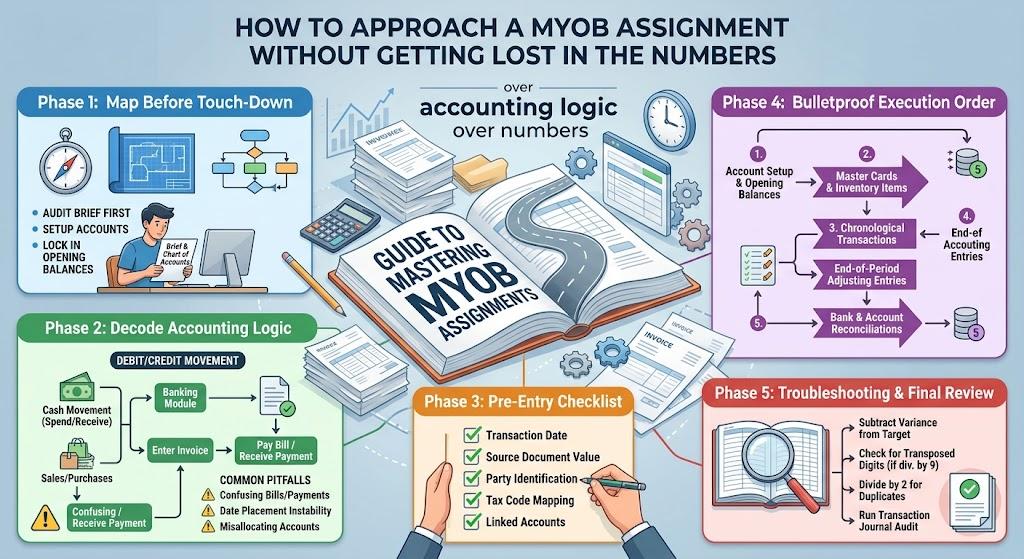
Read the entire brief first. Look for the accounting period, opening balances, transactions, customers, suppliers, inventory information and reports you are expected to produce.
Pay attention to the wording. A task asking you to enter transactions and prepare financial reports requires more than simply getting the data into the system.
It is worth checking the account structure before you begin too. If an account needs creating or changing, do it before your transactions depend on it. Correcting the structure halfway through can mean revisiting work you have already completed.
Think About What the Transaction Actually Means
Do not look at a transaction and see only an amount. Ask what has actually happened.
A supplier invoice, for example, means the business has received something and now owes the supplier. A later payment settles that amount; it does not create another expense simply because money has left the bank.
The same thinking applies to sales, receipts, transfers and expenses. Before entering anything, ask yourself:
What happened? Which accounts are affected? Has money actually moved yet?
That small pause can prevent some of the most common MYOB mistakes.
Dates matter too. A transaction recorded outside the required accounting period can change the figures shown in the final reports, even when the amount itself is correct.
Use the Four-Step Number Trail
There is one simple method that can make a MYOB assignment much easier to troubleshoot:
Source document → Transaction → Account → Report
Start with the original invoice, receipt, bank statement or other information given in the brief.
Then ask how that event should be recorded in MYOB. From there, identify which account changes and finally consider where that change should appear in the reports.
This gives you somewhere to go when something looks wrong.
Suppose an expense in the Profit and Loss report seems too high. Do not immediately change the figure. Follow it backwards. Find the account, identify the transactions making up the balance and compare those entries with the original documents.
You are no longer guessing. You are tracing evidence.
Check These Details Before You Enter Anything
Most mistakes are surprisingly ordinary. A wrong date, incorrect amount or unsuitable account can cause problems that only become obvious much later.
Before saving an entry, check:
-
Date: Does it fall within the assessment period?
-
Amount: Are you using the correct net, tax and total figures?
-
Account: Does the account actually reflect what happened?
-
Customer or supplier: Is the transaction attached to the correct party?
-
Tax treatment: Has the correct GST or tax treatment been applied?
-
Payment status: Is this an invoice, a payment or another type of transaction?
For students searching for MYOB assignment help UK, this is the important distinction to understand. Knowing where to click is useful, but understanding why the transaction belongs there is what allows you to spot mistakes when the numbers stop agreeing.
Follow a Sensible Order
There is no prize for entering everything as quickly as possible. A consistent order is safer.
Start with the account setup and opening balances. Then make sure the required customers, suppliers and inventory items are in place.
Next, work through the transactions in a logical sequence, usually by date. Keep related transactions together in your thinking, particularly invoices followed by later payments.
After each sensible batch, stop and check the balances. You do not have to wait until the final report to discover that something went wrong twenty transactions earlier.
Where the assignment includes adjustments such as depreciation, accruals or inventory changes, deal with those at the appropriate stage rather than mixing them casually into ordinary day-to-day entries.
Finally, complete the required reconciliations and reports.
Do Not Force the Numbers to Agree
This is one of the biggest traps in accounting assignments.
You may have a target figure in the brief or notice that your report differs from the expected result. Changing amounts until the totals match can make the problem worse.
Instead, isolate the difference and investigate it.
Look for a duplicated transaction, missing entry, incorrect date, wrong account or an amount that has been entered incorrectly. Review the transaction journal and compare the entries against the source material.
If the difference happens to resemble a familiar error pattern, that can provide a useful clue, but it should only be treated as a starting point. The original transaction still needs to be checked.
Most importantly, correct one confirmed error at a time. Otherwise, you can end up with a report that balances without knowing what actually fixed it.
Give the Final Reports a Proper Check
Exporting the reports is not the moment to switch off.
Start by checking the reporting period and required report types. Then look at the main figures and ask whether they can be explained by the transactions you entered.
Try the number trail again.
Pick an important figure from the report. Find the account behind it. Then find the transactions behind that account. Finally, compare them with the original documents.
This backward check is one of the best ways to catch mistakes because it tests the logic of the record rather than simply checking whether the screen looks tidy.
It also helps you understand your work well enough to explain it, rather than simply submitting a set of figures.
The Real Skill Is Following the Numbers
A MYOB assignment becomes much less confusing once you stop treating it as a software exercise.
The software records what you tell it. Your job is to understand the transaction, choose the appropriate treatment and check how that decision moves through the accounts and into the final reports.
Keep the four-part trail in mind:
Document → Transaction → Account → Report
Whenever something looks wrong, follow the number backwards.
That simple habit can save hours of blind corrections and, more importantly, teaches you how the accounting system actually fits together. Once the numbers have a story behind them, a MYOB assignment stops looking like a wall of figures and starts looking like a sequence you can follow, test and explain.